 hangil.app

Hangil Korean Pad
A small floating keyboard for writing Korean on a computer with no Korean IME installed. Type in romanization or on the 두벌식 layout, and watch the syllables assemble as you go.
Chrome or Edge 116 and later. Free, with every feature included.Coming shortly to the Chrome Web Store and Microsoft Edge Add-ons. The install buttons appear here the day each one publishes. Everything below is the documentation for the extension itself.
Coming shortly to Microsoft Edge Add-ons as well.
Coming shortly to the Chrome Web Store as well.
Getting started
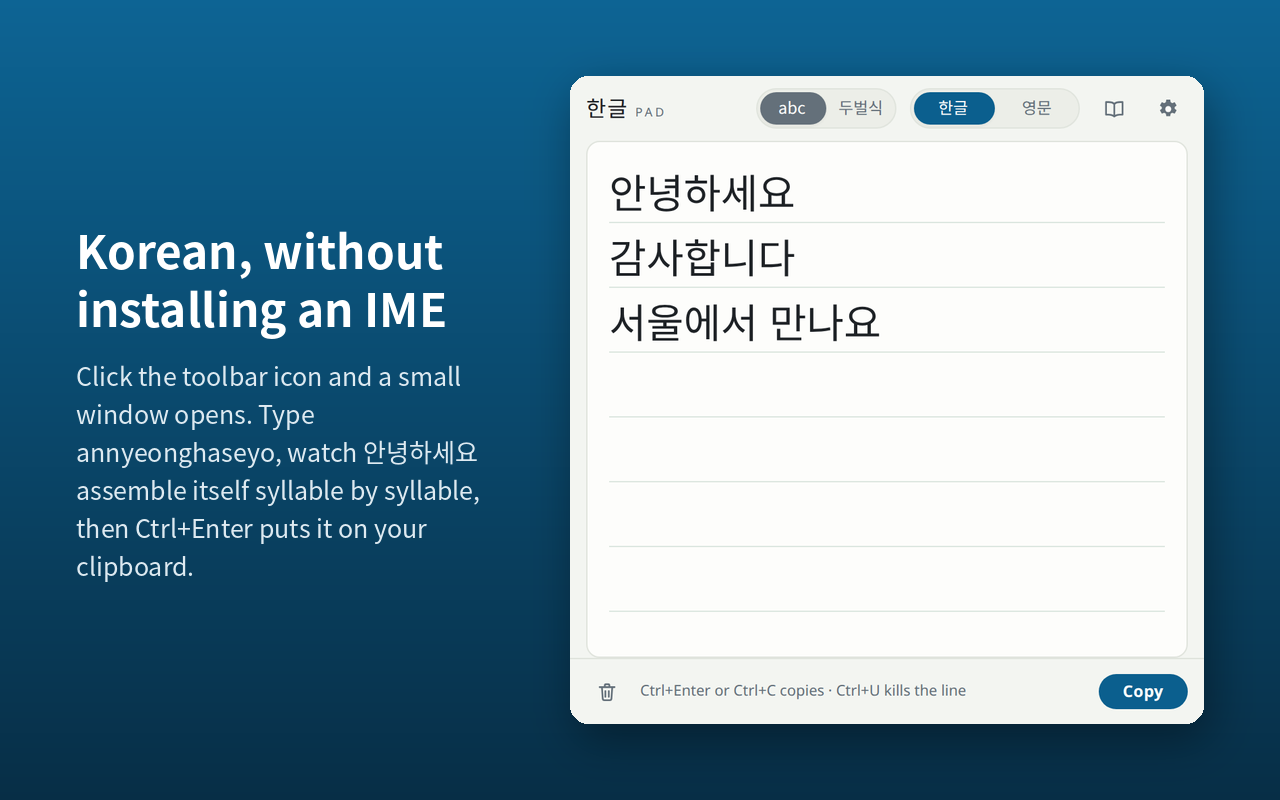
Click the toolbar icon and a compact window opens, detached from the browser. Type — in romanization or on the standard 두벌식 layout — watch the syllables assemble themselves as you go, then press Ctrl+Enter and it is on your clipboard. Nothing to install at the operating-system level, and nothing to configure.
Ordinary Korean is written in Hangul alone, so this is a complete input method rather than a useful fragment. There is no hanja conversion and nothing is waiting on a candidate list.
Which way to type
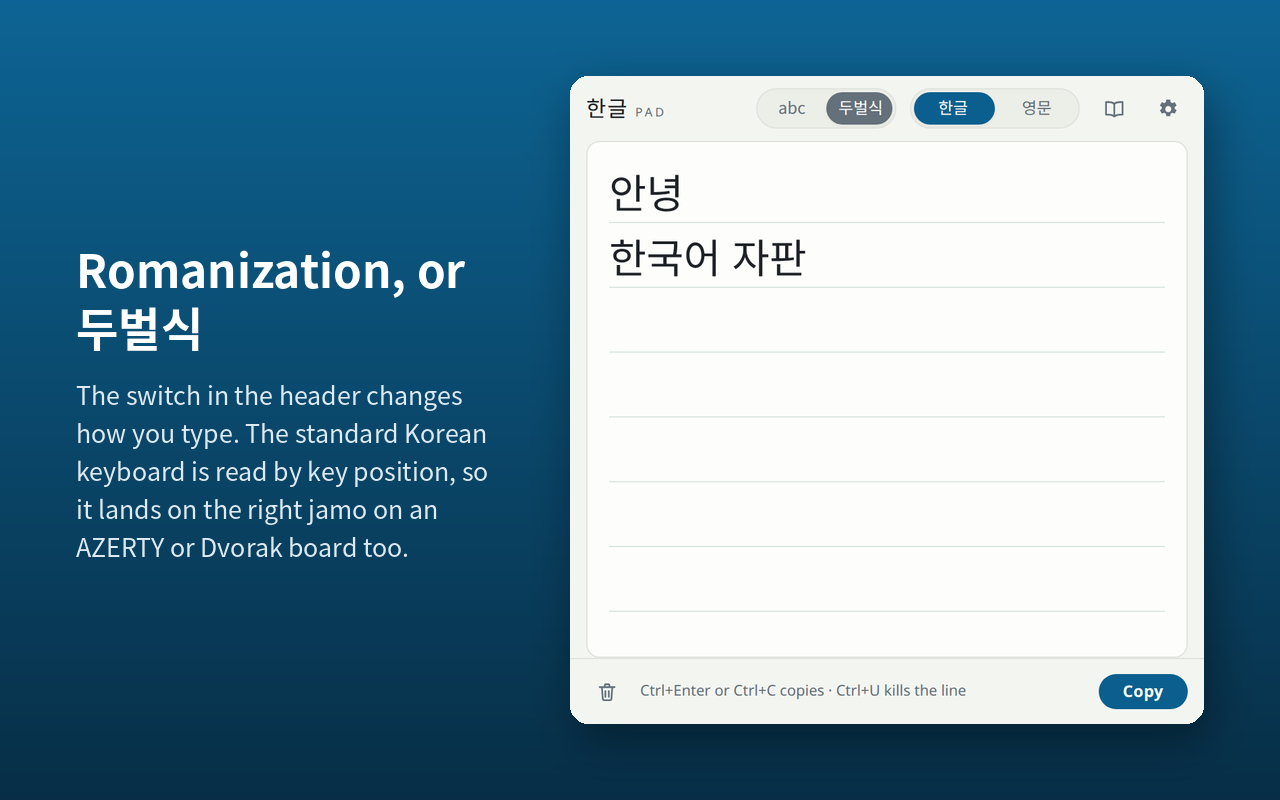
The abc / 두벌식 switch sits in
the header, left of the 한글 /
영문 one and built the same way: it shows
which method is in use and takes you to the other.
Ctrl+Shift+K does the same thing.
Romanization is the default, unless your browser is already in Korean, in which case 두벌식 is. A Korean speaker who has found this tool has already said which one they want; a learner gets the friendlier one.
The window stays open
It does not close when it loses focus. That is deliberate — the whole point is to type Korean here and then click into another window to paste. It also remembers its size and position, and your text is still there the next time you open it.
The window will not open
If clicking the toolbar icon appears to do nothing, the pad is probably already open behind your current window, or positioned on a monitor that is no longer connected. Clicking the icon again brings the existing window forward rather than opening a second one. To reset a window that has ended up off-screen, see Troubleshooting.
What it looks like
Keyboard
| Key | What it does |
|---|---|
| Alt+Shift+K | Open the pad from anywhere in the browser |
| Enter | A new line |
| Ctrl+Enter | Copy |
| Ctrl+C | Copy everything — or just the selection, if there is one |
| Ctrl+K | Switch between 한글 and 영문 |
| Ctrl+Shift+K | Switch between romanization and 두벌식 |
| Ctrl+U | Delete from the start of the line to the cursor |
| Ctrl+Shift+Backspace | Clear the pad — Ctrl+Z brings it back |
| Esc | Close the window, keeping your text |
On a Mac, use ⌘ wherever the table says Ctrl — the pad relabels these keys for you, and accepts either one.
The opening shortcut is rebindable. Go to
chrome://extensions/shortcuts, or
edge://extensions/shortcuts on Edge — you will need to
paste that into the address bar, since neither browser allows a web
page to link to it.
The 한글 / 영문 switch
Ctrl+K, or the switch in the header. 영문 passes every keystroke through untouched, for URLs, English words, passwords, and ㅋㅋ mixed with Latin. On 두벌식 every letter key produces a jamo, so this is not a nicety but the way out. The accent colour changes with the mode, so you can see which one you are in without typing to find out.
Romanization
One spelling per letter, the same in every position. g
is ㄱ everywhere and k is
ㅋ everywhere, which is what makes this
reversible where Revised Romanization is not — RR writes
한국 as hanguk, spelling the same
ㄱ two different ways depending on where it
lands.
Consonants
- ㄱg
- ㄴn
- ㄷd
- ㄹr · l
- ㅁm
- ㅂb
- ㅅs
- ㅈj
- ㅊch
- ㅋk
- ㅌt
- ㅍp
- ㅎh
- ㅇng
Tense consonants
- ㄲgg
- ㄸdd
- ㅃbb
- ㅆss
- ㅉjj
Each doubles its own letter rather than taking RR's spelling:
ㄲ is gg, not kk.
That is deliberate. ㅋㅋㅋ is how Korean
laughs online, and kk meaning
ㄲ would make it untypeable — so
kk is left free to mean exactly what it looks like.
Vowels
- ㅏa
- ㅐae
- ㅑya
- ㅒyae
- ㅓeo
- ㅔe
- ㅕyeo
- ㅖye
- ㅗo
- ㅘwa
- ㅙwae
- ㅚoe
- ㅛyo
- ㅜu
- ㅝwo
- ㅞwe
- ㅟwi
- ㅠyu
- ㅡeu
- ㅢui
- ㅣi
The silent ㅇ
You never type it at the start of a syllable — a vowel with nothing
in front of it is given one, so an is
안. At the end of a syllable it is spelled
ng, and a following vowel takes it apart again:
bang is 방, but
hangug is 한국, because the
g is followed by a u.
The hyphen, and when you need it
A hyphen ends the syllable. This is not an invention of the pad's: RR's own specification prescribes exactly this, for exactly this reason, with 중앙 jung-ang against 준강 jun-gang.
You need it whenever a syllable ending in a consonant is followed by one starting on a vowel, because those really are the same letters in the same order and nothing can tell them apart:
This catches every 이,
은 and 을 particle
after a consonant-final noun, so it comes up more often than it
first looks. Type -- when you want a literal hyphen.
Syllables that build themselves
Blocks assemble the way an IME assembles them. A finished syllable gives its final consonant up to open the next one the moment a vowel arrives, and half a compound final leaves while the other half stays. Nothing is ever re-converted behind you — what changes is only the syllable you are still inside.
If the spellings feel wrong
People who know Revised Romanization will meet some friction:
떡볶이 is ddeogbogg-i here,
not tteokbokki. That is the price of a scheme that inverts,
and 두벌식 is one click away if you would
rather not pay it.
The 두벌식 layout
The standard Korean keyboard. One key, one letter; no hyphens and no ambiguity, because all of the difficulty above is an artefact of romanization and simply does not exist here.
Keys are read by position, not by the letter your operating system thinks you pressed, so the layout is unchanged on an AZERTY or Dvorak keyboard — and it agrees with a physical Korean keyboard, which prints Hangul on these same QWERTY positions.
The letter under each key is the key you press; the small blue jamo in the corner is what Shift gives. Seven keys have one: the five tense consonants, and ㅒ and ㅖ.
세벌식 is not supported.
Settings
The settings panel opens from the gear in the pad's header. Your preferences follow your browser profile, so the same choices show up on your other machines.
The typing guide, in a window of its own
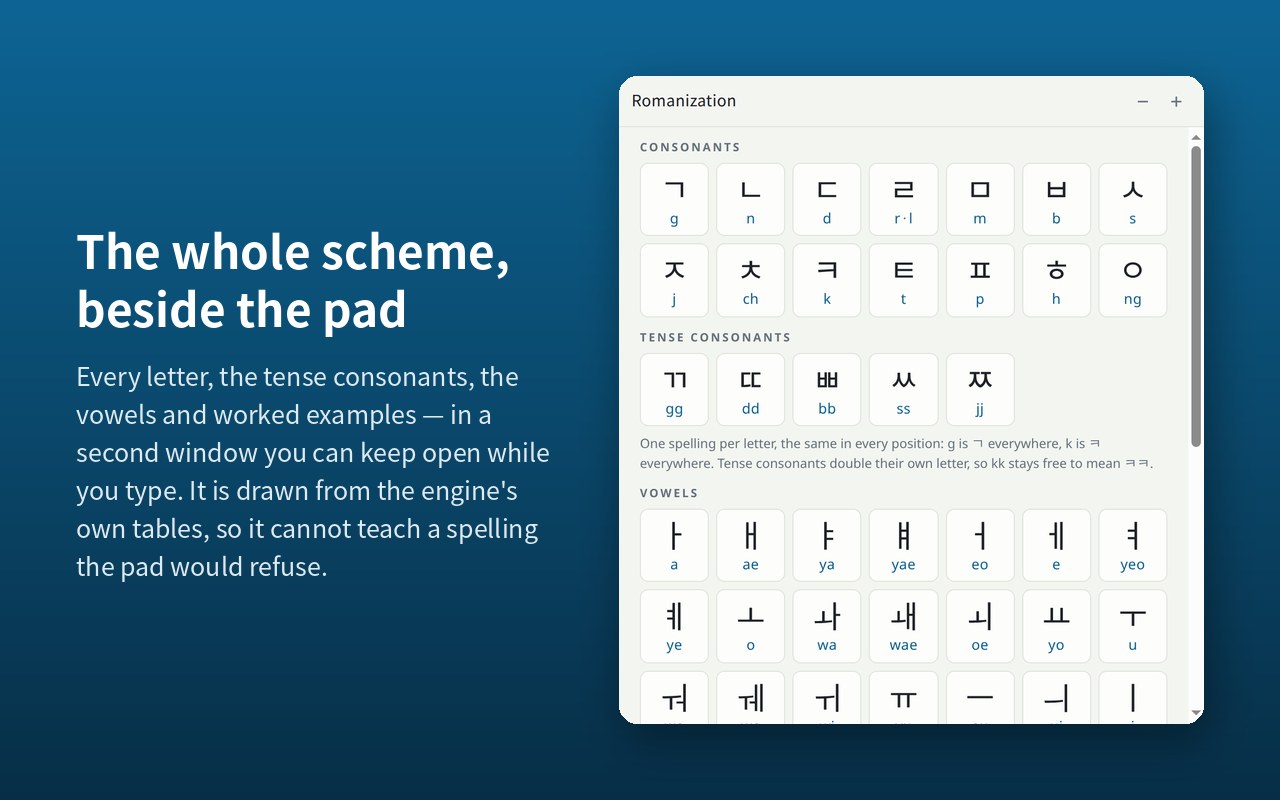
The panel carries the reference chart for whichever input method is in use, at a size meant for glancing at. The book icon in the header — or Open this guide in its own window, under the chart — puts the same chart in a second window beside the pad: letters big enough to read across a desk, worked examples, and − / + for anyone who wants it larger still.
It is a reading copy, not a second set of settings. It follows the input method, language and font the pad is set to, and closes when the pad does. Both charts are drawn from the engine's own tables, so a spelling the guide teaches is by construction one the pad accepts.
Writing surface
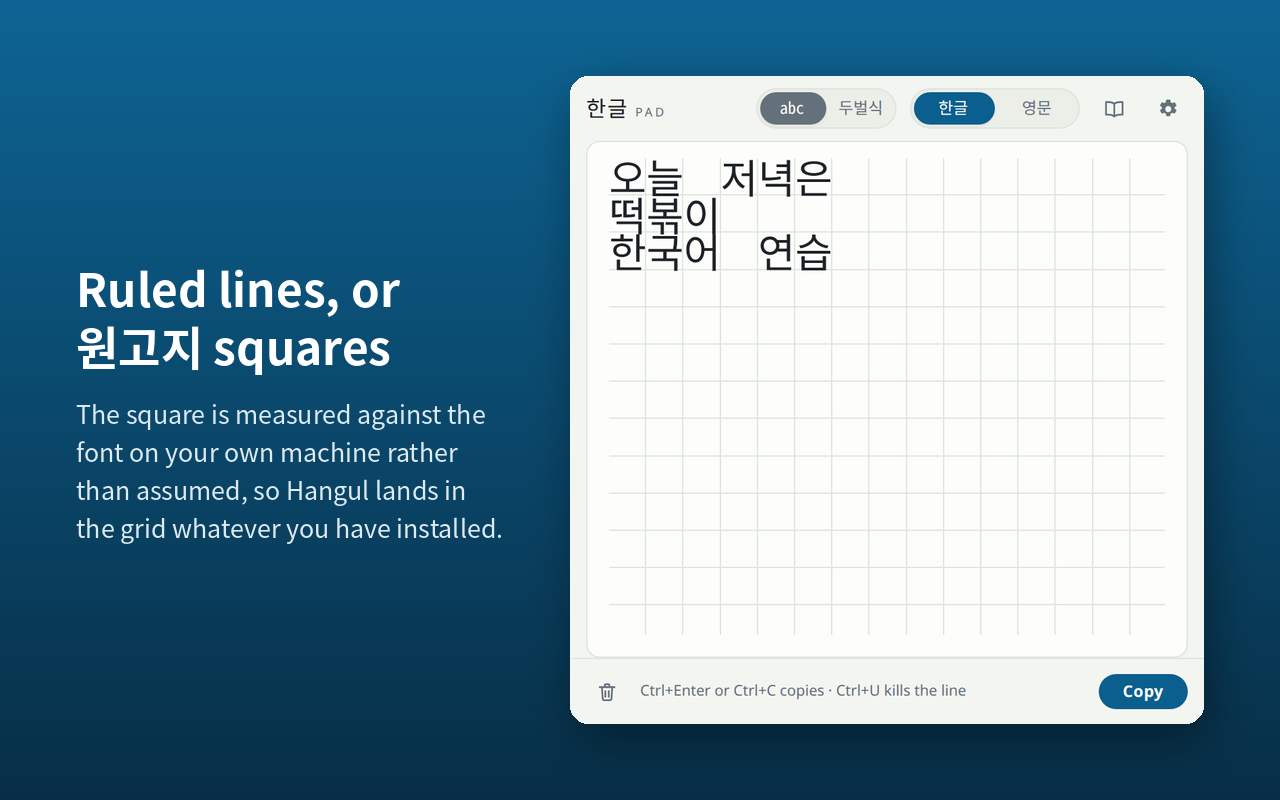
Ruled lines, or 원고지 squares. Both accept both scripts, so the choice is purely cosmetic and nothing about your text changes when you switch.
The 원고지 cell is measured rather than assumed — Hangul does not advance a full em in the fonts people actually have, whatever the design drawings say — so Korean lines up with the squares on any machine. Latin only does when the installed face happens to draw it at half a cell, and the panel says plainly when it does not.
Font and size
Five families — Gothic 고딕, Myeongjo 명조, Dotum 돋움, Gungsuh 궁서 and Monospace 고정폭 — and any size from 18 to 56 px. Text is set large by default, because the people who need this tool are often still learning to read it.
The fonts come from your own computer rather than being downloaded, which means the list depends on what you have installed. See the font note under Troubleshooting.
Starting over
Three controls at the foot of the panel undo things: Reset all settings to defaults, Reset the window size and position, and Erase the text and its history. The first two do not touch what you have typed; the third is meant to.
Interface language
English, 한국어, 日本語, 简体中文, 繁體中文 and ไทย. The pad follows your browser's language by default, and the setting overrules it — because plenty of learners run an English browser while wanting a Korean interface, or the reverse.
Troubleshooting
hangugingave me 한구긴, not 한국인-
Both are correct readings of those letters in that order, so the
hyphen picks between them:
hangug-inis 한국인. See the hyphen. If this comes up often enough to be tiring, 두벌식 has no hyphens at all. - I want ㅋㅋㅋ and I keep getting ㄲ
-
You will not — that is the one thing this scheme goes out of its
way to protect. ㄲ is
gg, andkkkgives you ㅋㅋㅋ exactly as typed. - A font is marked “not installed”
- The pad uses fonts installed on your computer and detects them by measuring, so a family it cannot measure apart from your system's fallback is reported as absent. On Windows and macOS all five are normally found. On Linux, a machine whose only Korean face is a Noto CJK one will see several marked absent even though the text renders perfectly well — the label is being cautious, not reporting a failure. Installing the Nanum or D2Coding families gives the picker something it can tell apart.
- Latin drifts out of the 원고지 grid
- The squares are sized from the width your Korean font actually gives Hangul. Latin lands in them only when that same font draws it at exactly half a square, which most do not. Korean always fits; the panel says so when Latin will not. Ruled lines are the surface to use for a line that is mostly Latin.
- Alt+Shift+K does not open the pad
-
Another extension or an operating-system shortcut has most likely
claimed the same combination. Both browsers assign the shortcut
to whichever extension registered it first and silently leave the
other unbound. Open
chrome://extensions/shortcutsoredge://extensions/shortcuts, find Hangil Korean Pad, and set a combination of your own. - The pad opened somewhere I cannot reach
- It remembers where it was last, which is unhelpful if that was a monitor you have since unplugged. Open the settings panel and choose Reset the window size and position: the pad returns to its default size and re-centers itself on the screen you are actually using, and the guide window follows it. Your text and your other settings are kept.
- I cleared the pad by accident
- Ctrl+Z brings it back, as long as the pad still has focus and you have not closed the window. The one exception is Erase the text and its history in the settings panel, which is meant not to come back: it empties the pad, drops the draft kept for next time, and puts both beyond Ctrl+Z. Your clipboard is not touched either way.
- Can it convert hanja?
- No. There is no hanja conversion, no dictionary and no candidate list. Ordinary Korean prose is written in Hangul alone, so this is a deliberate limit rather than a missing feature: it keeps the window to one text box, and it keeps the permissions to almost nothing.
- Can it type directly into a web page?
- No. The pad is a separate window and you paste from it. Typing into the page underneath would require permission to read and modify every site you visit, which the extension deliberately does not ask for.
- Does it work in other browsers?
- It is built for Chrome and Microsoft Edge, version 116 and later. Firefox and Safari are not supported at present.
Privacy
Hangil Korean Pad collects no data of any kind. Nothing you type leaves your machine.
The extension makes no network requests at all, and it has no access to any web page — no host permissions, and no content script running on the sites you visit. The Korean fonts come from your own computer rather than being loaded from the web. There is no third-party code in the extension, and no account, analytics or telemetry.
It asks for two permissions, and that is the whole list:
| Permission | Why |
|---|---|
| storage | Saves your pad text, the window's size and position, and your preferences — input method, interface language, writing surface, font, text size and copy behavior — so they are still there next time. This is stored by your browser, in your own profile. |
| clipboardWrite | Writes the Hangul to your clipboard when you press the copy button or Ctrl+Enter. |
If your browser profile is signed in and syncing, your settings travel with it between your own machines through your browser's own sync, the same way your bookmarks do. That is a browser account feature and not a service run by us — we operate no servers and receive nothing.
This page itself is a web page on hangil.app and, like the rest of the site, carries Google's advertising tag for measurement. That applies to your visit to this page only. It is not part of the extension, and the extension loads nothing of the kind.
Support and contact
Questions, bug reports and suggestions are welcome by email: info@hangil.app.
For a bug report, these three things make it far easier to work out what happened:
- Your browser and version —
chrome://versionoredge://versionhas it - Your operating system
- What you typed, which input method you were in, and what appeared instead of what you expected
This is a small tool maintained by one person, so a reply may take a few days.
The pad is free and stays free. Every feature is there from the moment you install it — no account, no trial, no upgrade. There is a tip jar at the foot of the settings panel for anyone who wants to say thanks, and it is a link and nothing more: no reminders, no counting, and nothing held back behind it.
Writing Japanese as well? Hangil Kana Pad is the same pad for hiragana and katakana.
Legal
Hangil Korean Pad is copyright © 2026 Gilbert Ramirez. All rights reserved.
The Hangul engine, both input front-ends and the reference charts are this project's own work. The extension contains no third-party code and loads none at runtime.
Google Chrome and Microsoft Edge are trademarks of their respective owners.