 hangil.app
中文版
hangil.app
中文版

Chinese Font Fix for Miro
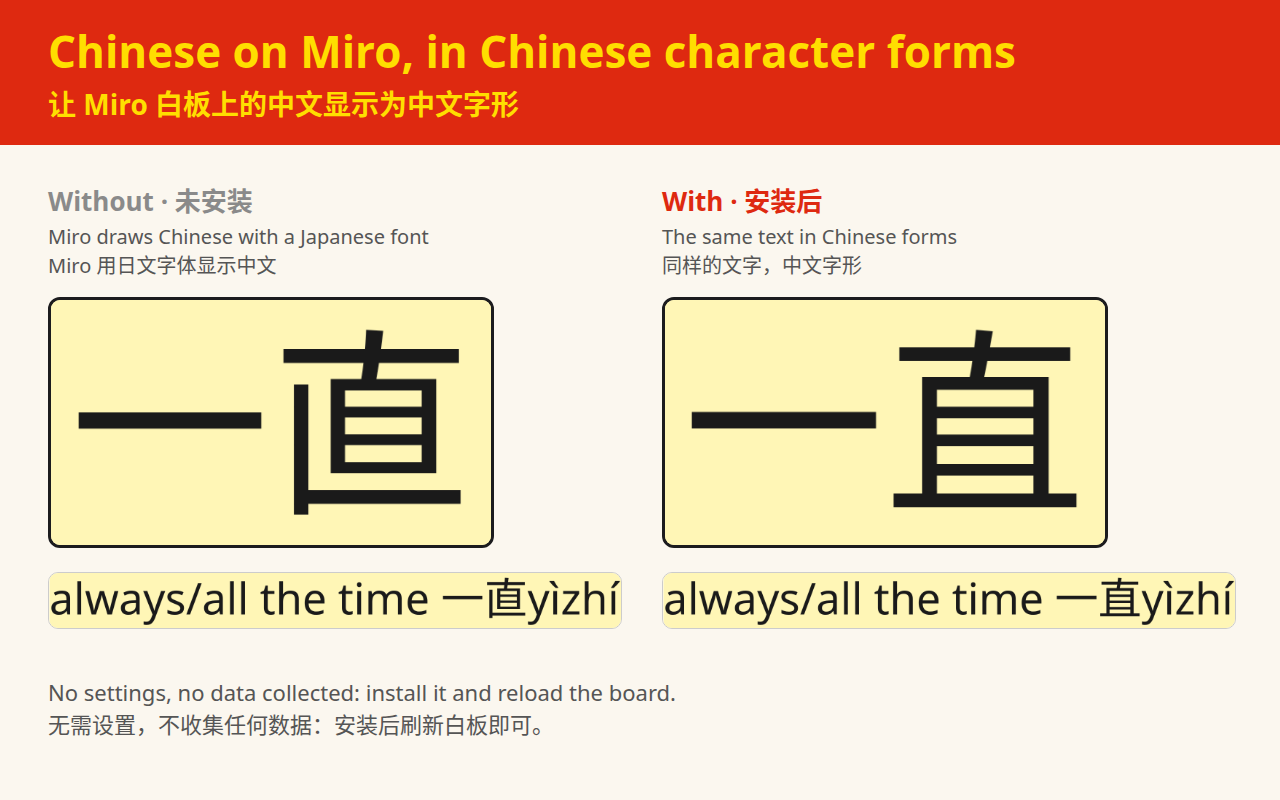
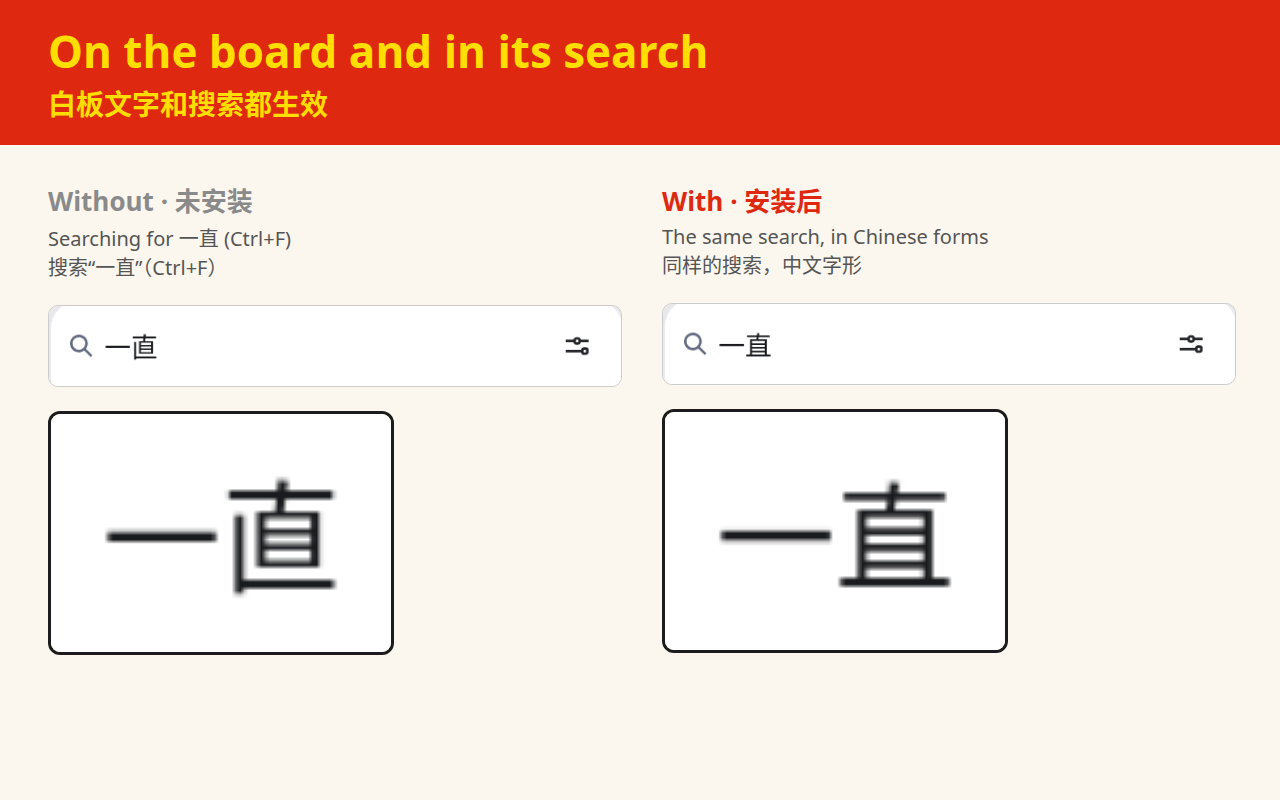
Miro shows Chinese in a Japanese font, so some characters come out in their Japanese forms. This extension makes Miro show them the Chinese way, on the board and in its search.
Chrome or Edge, on a computer. Free.Coming shortly to the Chrome Web Store and Microsoft Edge Add-ons. The install buttons appear here the day each one publishes.
Coming shortly to Microsoft Edge Add-ons as well.
Coming shortly to the Chrome Web Store as well.
What it fixes
Chinese and Japanese share most of their characters, and a computer stores each one only once: the font decides how it is drawn. Many characters look the same either way, but many differ in a stroke or two — 直、骨、角、写, and full-width punctuation such as ;!?.
Miro draws Chinese with a Japanese font, on the board and in the rest of the page, its search box included. So anyone reading Chinese on Miro sees the Japanese forms of those characters, not the ones they know: native speakers, and teachers and students of Chinese alike.
With the extension, Miro shows them in simplified Chinese forms. Latin letters, Japanese kana and everything else stay exactly as they were.
Getting started
- Add it to Chrome or Edge from the store, with the button at the top of this page.
- Reload any Miro board that is already open: the fonts are added as the page opens.
That's all. There are no settings and nothing to click: it works on every Miro board you open from then on.
To turn it off, open chrome://extensions (or
edge://extensions in Edge), switch Chinese Font Fix for
Miro off, and reload the board.
For teachers
Anyone who reads Chinese on Miro can use it; it was made for a Chinese teacher's lessons. The extension changes what each person's own browser shows. It does not change the board, so every student who wants the Chinese forms installs it in their own browser.
It works in Chrome and Edge on a computer. It can't change the Miro app, or Miro in a phone's browser.
Questions
- I installed it and nothing changed
-
Reload the board's tab: the fonts are added as the page opens,
so a board that was already open keeps the old ones. Check that
the extension is switched on at
chrome://extensionsoredge://extensions. And it only works in Chrome and Edge on a computer, not in the Miro app. - Does it change my board for other people?
- No. Nothing on the board is edited. It changes only how your own browser draws the text.
- How does it work?
- Miro's pages ask for a Japanese font for any character their Latin fonts don't have, and name no Chinese font at all. The extension adds Chinese fonts (Noto Sans SC and Noto Serif SC) under that same Japanese font's name, for Chinese characters and punctuation only, so your browser uses them instead. Miro itself is not changed.
- Can it show traditional Chinese forms?
- Not yet: it shows simplified Chinese forms. If you would use traditional forms (Taiwan or Hong Kong), please write and say so.
- I read Japanese on Miro too
- Then switch it off while you do: with it on, Japanese kanji take the Chinese forms as well. Kana are not affected.
- Does it need the internet, or download anything?
- No. The fonts come inside the extension (about 10 MB), so it fetches nothing, from anywhere.
- Why doesn't Miro fix this itself?
- It has been reported on Miro's community forum. Until Miro changes its fonts, this extension fills the gap.
Privacy
Chinese Font Fix for Miro collects no data of any kind.
It asks for no permissions. It runs only on Miro's board pages
(miro.com/app/…), where all it does is add fonts to the
page: it reads nothing from the page and sends nothing anywhere. It
makes no network requests; its fonts load from inside the extension.
There is no account, no analytics and no third-party code.
You needn't take this on trust: its source code is public, on GitHub.
This page itself is a web page on hangil.app and, like the rest of the site, carries Google's advertising tag for measurement. That applies to your visit to this page only. It is not part of the extension, and the extension loads nothing of the kind.
Support and contact
Questions, bug reports and suggestions are welcome by email, in English or Chinese: info@hangil.app.
For a bug report, these make it far easier to work out what happened:
- Your browser and version —
chrome://versionoredge://versionhas it - Your operating system
- The characters that look wrong, and a screenshot if you can
This is a small tool maintained by one person, so a reply may take a few days.
Legal
Chinese Font Fix for Miro is copyright © 2026 Gilbert Ramirez, and its source code is open under the MIT License.
The fonts it carries, Noto Sans SC and Noto Serif SC, are © Google and Adobe, under the SIL Open Font License 1.1, and are included as Google Fonts distributes them.
This extension is not affiliated with, endorsed by or made by Miro. Miro is a trademark of its owner. Google Chrome and Microsoft Edge are trademarks of their respective owners.